Maps are important tools to depict the spatial distribution of the places, objects, phenomenon, activities, and their information. Having a map of the spatial information of anything that we want to explore / visit / document is an advantage using which can perform our work more efficiently. Maps have importance in all kinds of streams, whether it is research & study or defense or social survey or business or politics or any branch of knowledge. In the modern time when we have digital technology available and accessible to everyone, use of maps has also become very common in travel, transport and sharing the location of someone or something. The best advantage of having maps in the digital gadgets in our hands is that it helps in reducing the chances of getting lost or wandered.
Ecological mapping or Eco mapping is the mapping technique by which One can determine location of living beings, species or ecosystems or natural habitats, their attributes and functions on the Earth, in reference to their spatial and temporal variations. Eco mapping offers suitable resolutions, based upon a regionalized process, and provides an ecological basis for planning activities that may impact upon the environment. Now a day eco mapping is an important technique applied in the natural resource management, apart from being useful in prediction of the natural phenomenons eco mapping is immensely useful in prospecting of natural resources and policy frameworks as well.
A layman can do Eco-Mapping in own area using two useful tools & techniques – Global Positioning System and Google Earth Pro.
(i) Global Positioning System (GPS)
Global Positioning System (GPS) has revolutionized positioning concepts, though it stated primarily as a navigation system. It has wide range of geodetic, geophysical, navigational, marine, military and social applications. GPS is a space-based radio navigation system. It is comprised of three parts – The space segment, the control segment and the user segment. The user in her/his device receives the navigation signals (viz. location, movement and direction etc) and can perform movements and record location / position and other observations.
Applications of GPS
Location : Determining a basic position (Latitude, Longitude and Altitude).
Navigation : Getting direction from one location to another.
Mapping : Creating maps.
Timing : Providing precise timing.
Other Applications : Application in agriculture, Mobile mapping, Eco-mapping, Marine application, Military application, Space application etc.
What is GPS device?
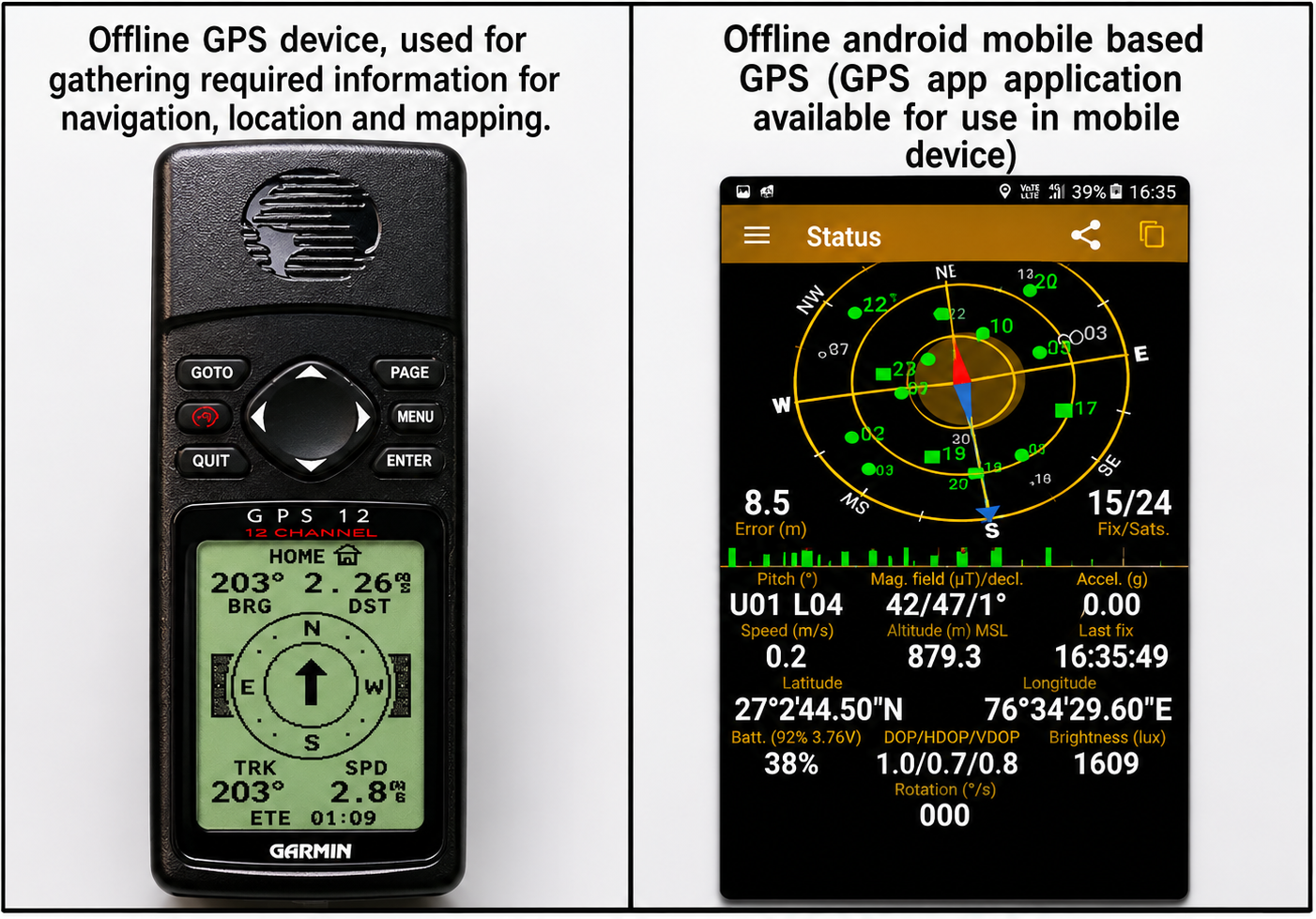
Scientists and others use specialized devices called GPS handheld instruments for precise navigation in important national and international operations. However, advancements in technology have made GPS applications accessible to the public. Nowadays, GPS applications are also available on mobile devices, allowing people to easily determine their location or navigate for various purposes using a GPS satellite signal receiver device.
A. offline GPS device, used for gathering required information for navigation, location and mapping –
B. Offline android mobile based GPS (GPS app application available for use in mobile device)
(ii) Google Earth
Google Earth Pro is a computer program that displays the whole globe on a computer screen in 3D visualization of the Earth’s satellite imagery. Users can view different features on Google Earth from various angles by layering satellite images, aerial photographs, and additional information like roads, railways, cities, and landmarks onto a 3D model of the Earth. Google Earth is also accessible on desktop and mobile devices and serves the purposes of mapping.
Everywhere is at somewhere
Googles geo tools aren't just about geography. You can use them to trace routes from Shri Nagar to Kanyakumari, Marco Polo's journey through Asia, to explore the architecture of Barcelona or Delhi, to measure how glaciers of Alaska and Himalaya are receding, or to analyse the habitats of the animals and plants. Geospatial thinking has transformed our perceptions of the world around us, and how we address issues such as climate change and the protection of wildlife and environment.
Applications of Google Earth
Location : Find spatial details of place on one click (Latitude, Longitude and Place Name, previous images of the same point too)
Navigation : Getting direction from one location to another.
Mapping : Compose map with the background of high resolution satellite imageries.
Other Applications : Mark and save track, place and features, Land use and Land cover mapping (different land features like forest, agriculture, water bodies, river, elevations, drainage, human settlements, city, road etc)
Both GPS and Google Earth Pro applications are user-friendly tools for eco-mapping that can be utilized by ordinary individuals. They enable the creation of various digital records associated with specific locations and times for diverse purposes.
In this exercise we shall know and understand how we can mark and record geographical location on the Earth.
â— Google Earth application either installed in mobile or in desktop computer,
â— .GPS handheld instrument or GPS application in the android mobile,
â— Color leaflet
How to use Android Mobile Base GPS?
â— Download 'GPS Status' android mobile application through Google play store and install this application.
â— Open location service from mobile, then open 'GPS Status' application.
How to use Google Earth?
â— Computer/Web Based Google Earth - Download Google Earth from given link for desktop: https://www.google.com/intl/en_in/earth/versions/#download-pro
â— Android Mobile Based Google Earth - Install Google Earth application from Google play store.

â— .Record your GPS location (i.e. Latitude and Longitude), it is your current location on the Earth.
â— Move around in your area (or if you travel to a far place) and record your location at that place (i.e. your location on the Earth at that time).
â— You can make a list of locations (your location on the Earth, based on your movement from one place to another.
â— Now later on using Google Earth application which is installed in your mobile or desktop computer, you can paste your recorded location in the Google Earth's 'Search' bar and see where you were on the Earth.
â— You can put many locations on the Google Earth in this way and then can capture / save its image for depicting distribution of your recorded locations (distribution of any other thing that you record in different locations).
â— You can save Google Earth file of your own location/distribution for future reference and use in making maps etc.
You can present your location data along with name or description of place, latitudinal and longitudinal location recorded and other features. Similarly, you can present the location data for any purpose. Simultaneously you can depict your locations on the maps using Google Earth application. Both location data and map depiction can be accompanied with other primary or secondary data and/or information.
Location data and map depiction can be used in data documentation and analysis of information collected related to parameters of water, soil, biodiversity and any other entities & their attributes.
Where We Are - An Exercise for Eco-Mapping
There are two steps for mapping -
1.- Collection of spatial and temporal field data,
2.- Mapping through Google Earth
Field data collection: Follow the below steps for field data collection
1.- Open 'GPS Status' android application (Internet connection is required) to get the geographical information (viz. latitude, longitude, time, altitude etc.) displayed on application.
2.- Open 'Location' service in the android mobile.
3.- Go to that place which you want to map.
4.- Identify the different geographical features seen in the application.
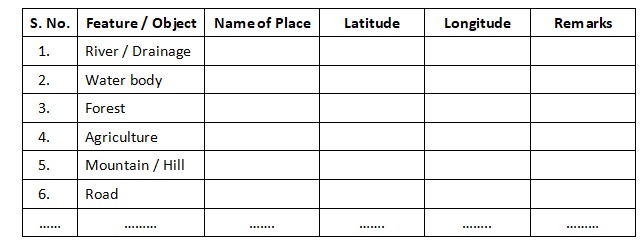
5.- Then, start to collect locations of your selected study area and fill in the data sheet. An example of data sheet is given here, you can design your own data format according to need
Mapping through Google Earth- Follow the below steps for mapping on Google Earth;
1.- Open 'Google Earth' on desktop.
2.- Identify the different geographical features seen in the Google Earth application.
3.- Type place name or latitude & longitude in search bar of Google Earth which you have saved in data sheet.
4.- Start editing on Google Earth map for location, boundary, route, area, marking additional points etc and other options to generate and save the picture as desired.
â— Concepts of geographical locations, distance and direction,
â— Marking/recording geographical locations in the form of latitude and longitude as reference points of location on the Earth),
â— Idea of different locations in reference to the whole Earth;
â— Recording locations of different places, things, organisms, incidents and storing them in own data bank for further reference.
â— Marking of recorded locations in Google Earth application and making location maps (distribution maps of desired object)
1- What is the meaning of degree, minute, second in reference to geographical location?
2- Is it possible to record location of an airplane while flying?
3- Does the point of location is seen changing itself if we tilt the globe on Google Earth?
4- How do guided missiles find their target far from hundreds of kilometers distance?
5- What would happen while recording the location if the sky is covered with clouds or you enter a valley area or a dense canopy forest or enter a cave?
6- Can you record the location of different public gardens of your city, or water bodies in and around your village, or locations of a rare tree species found in your region, or locations of shops in your village and so on?
7- Can you prepare a location and distribution map for your village or city to depict the places where waterlogged conditions develop during rainy season, and solution for channelizing that water to nearby drain or percolate in the ground?